Importing and ripping
Audeeport pulls music into your library three ways: it points at folders you already have, it reads your old iTunes or Music.app library, and it rips CDs straight to disk. None of these move or rewrite your files unless you ask.
Add folders, drives, and NAS
Settings > Library > Add Folder. Point Audeeport at one or more locations: your Music directory, an external drive, a NAS mount, anywhere your files live. Add as many as you want.
Nothing is copied or moved. Audeeport indexes the files in place and reads them where they sit. An external drive or a network share works exactly like a local folder. When the drive or mount goes away, those tracks grey out until it comes back. There’s no second copy taking up space and nothing to keep in sync.
The scanner reads tags first and falls back to your folder structure when tags are thin. Album art is found in the album folder, an Artwork/ subfolder, or one level up. CD1 / CD2 / Disc N subfolders are folded into a single album automatically. .cue sheets, including CUE data embedded in a single audio file, are parsed into individual virtual tracks with the right start and end times.
A time estimate appears before any long scan. Quit mid-scan and you pick up where you left off on the next launch.
Import from iTunes or Music.app
If you’re coming from Apple’s app, Audeeport reads its library XML directly. It looks in the usual spots under ~/Music (the old iTunes Music Library.xml and the newer Music Library.xml) and pulls in your tracks with their title, artist, album, genre, year, duration, play counts, and star ratings, plus your user playlists. Ratings convert from Apple’s 0 to 100 scale to the 1 to 5 stars Audeeport uses.
Only tracks whose files still exist on disk are imported. The XML is a reference, so your audio stays where it is.
This importer is desktop only.
Rip CDs
Audeeport rips audio CDs straight into your library on desktop only. Insert a disc, open the Ripping view, and Audeeport reads the table of contents and offers a metadata lookup.
The read path uses libcdio with libparanoia for secure, error-corrected extraction, so scratched discs are re-read rather than guessed at. Each track streams as raw PCM into FFmpeg, which encodes it and writes the tags and cover art in one pass. You choose the format:
- FLAC. Lossless, compression level 5.
- MP3. V2 VBR, around 190 kbps, for when size matters more than fidelity.
Rips land under ~/Music/audeeport-music/<artist>/<album>/, with a cover.jpg dropped beside the tracks, and the album is added to your library automatically when the disc finishes. You can also point rips at one of your existing source folders. If a track fails, Audeeport deletes the partial file and carries on with the rest of the disc; cancelling cleans up the track in flight and keeps the ones already done.
Clean up metadata, review before writing
Rips and downloads often arrive with messy or missing tags. Open an album’s action bar and choose Analyze. Audeeport checks your tags against MusicBrainz, the canonical music database, and when text matching comes up short it falls back to audio fingerprinting (Chromaprint plus AcoustID) to identify the actual recording from its sound. Discogs and TheAudioDB sit behind that as further fallbacks, and missing cover art is pulled from the Cover Art Archive.
The important part: nothing is written until you confirm. You review the proposed metadata album by album, accept or reject per album, and then choose whether to write to the library only or to the file tags as well. A long analysis pass survives a restart; a resume dialog offers to continue where you left off.
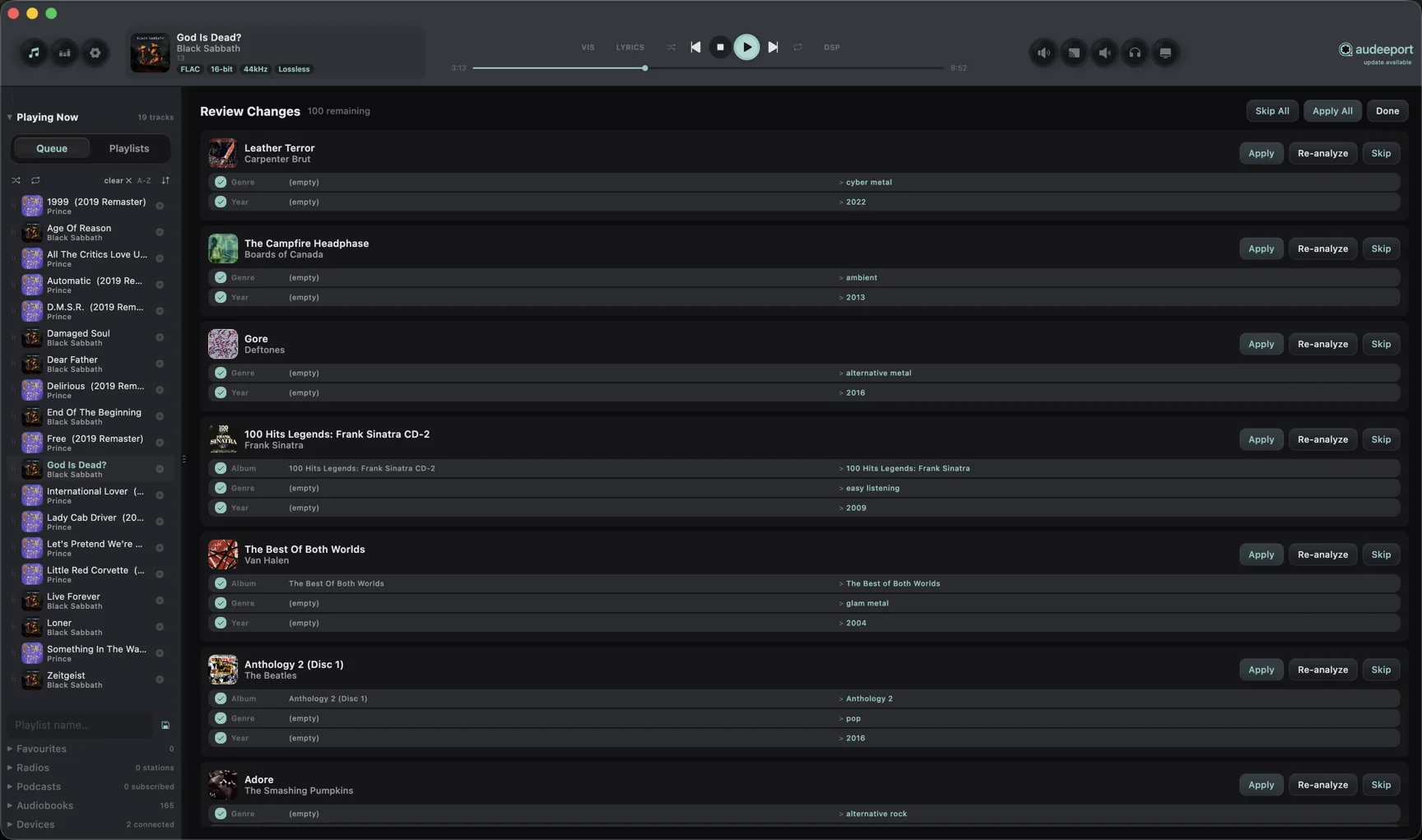
For the narrower job of tidying track titles, an album’s track table has a wand icon that opens Clean up track titles. It strips rip-tool junk such as leading year, artist, album, or track-number prefixes, previews every change before it applies, and lets you write to the library only or to the file tags as well.
Library analysis is desktop only. Mobile builds play and browse the library; metadata cleanup and ripping happen on the desktop.
Format support
Audeeport decodes lossless (FLAC, ALAC, WAV, AIFF, APE, DSD via DoP, WavPack and more) and lossy (MP3, AAC, OGG Vorbis, Opus, WMA) formats through its bundled engine. The full list, plus how the engine handles sample rate and bit depth, is in the Audio engine reference.
Where to go next
- Getting started. Install, activate, add music.
- Audio engine. Formats and the playback path.
- Privacy. What leaves your machine during analysis, and what never does.