Agent control
Audeeport’s desktop build ships a headless daemon: a small, local HTTP service that lets an AI agent or a plain shell script drive and inspect the player without the GUI. It exposes playback, library, EQ, plugins, devices, sync, and more as a token-authenticated REST API on your machine. This is a desktop feature. It is not available on the mobile apps.
Turning it on
You enable the daemon explicitly. It does not run unless you ask for it.
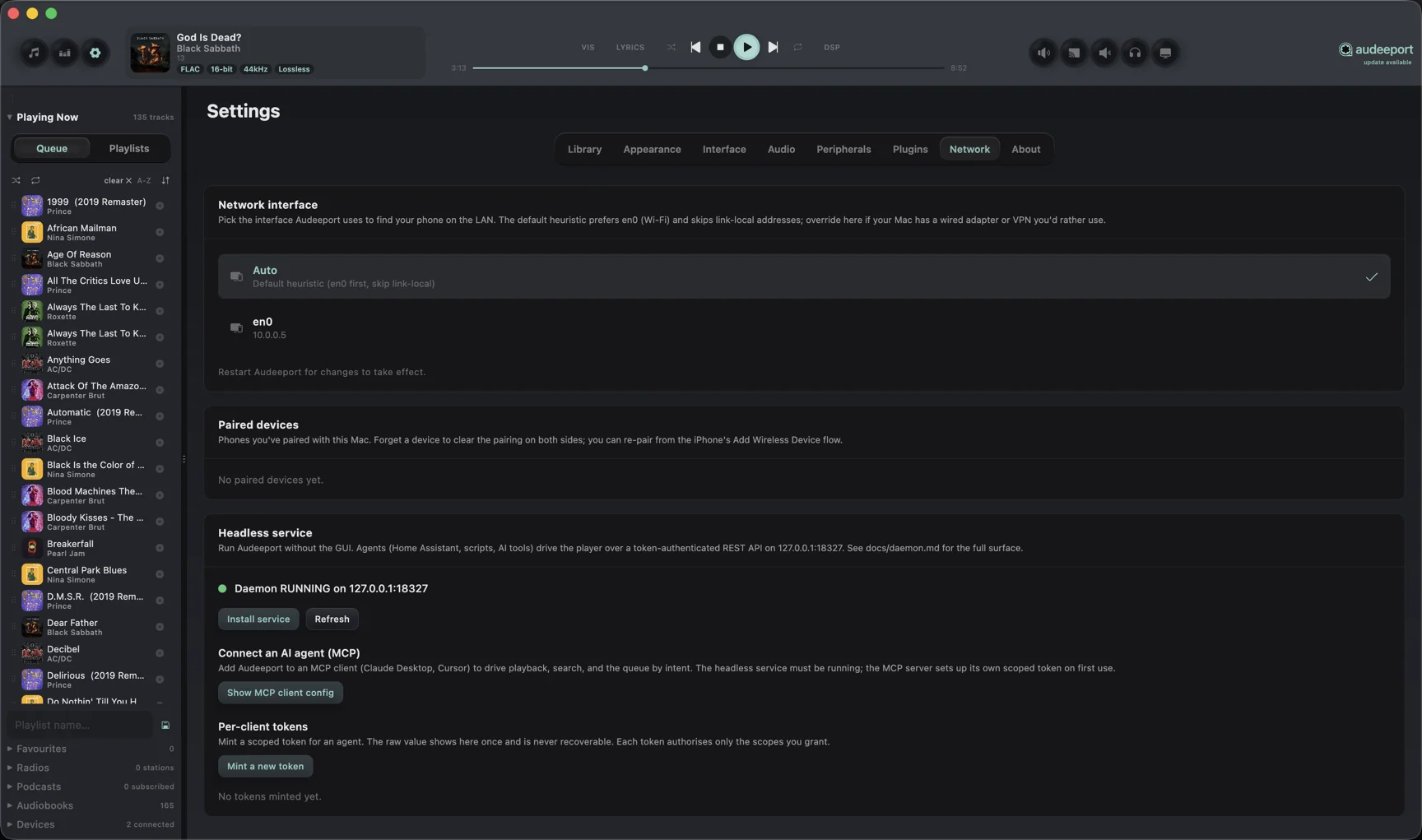
- From the app. Open Settings, then Network, and find the “Headless service” card. “Install service” registers a background service (launchd on macOS, systemd on Linux) that starts the daemon on login. “Uninstall service” removes it.
- From the command line. Run
audeeport --daemonto start the daemon in the foreground for the current session, oraudeeport --install-daemonto install the background service (andaudeeport --uninstall-daemonto remove it).audeeport --daemon-statusreports whether it is running and installed.
The default port is 18327. The actual port is logged on start in case it was taken.
How it stays safe
Two guards keep the daemon from becoming a remote-control hole:
- Loopback only. The service binds to
127.0.0.1, never to a routable interface. Nothing on your network can reach it. - Bearer token. Every request must carry an
Authorization: Bearer <token>header. On first start the daemon generates a master token and writes it to~/.audeeport/master-token(a single line, file mode 0600). The master token authorises every endpoint.
For day-to-day automation you don’t have to hand out the master token. The Settings card (and the auth endpoints) let you mint scoped per-client tokens: each one is granted only the permissions you choose, the raw value is shown exactly once, and you can revoke it later without disturbing your other tokens. Minted tokens are stored as hashes under ~/.audeeport/tokens/, so a leaked token file can’t be replayed.
Scopes
Tokens carry granular scopes of the form <verb>:<resource>, for example read:library, write:playback, or write:eq. The check is exact set membership with no implicit hierarchy, so write:library does not imply read:library. Grant a client both only if it needs both. This lets you, say, give a sync agent write:library without also letting it enumerate your collection. The master token uses a wildcard scope that satisfies every endpoint.
Talking to it
Read a token, then call the endpoints. From a second terminal:
TOKEN=$(cat ~/.audeeport/master-token)

# Liveness and build info
curl -H "Authorization: Bearer $TOKEN" \
  http://127.0.0.1:18327/health

# The full endpoint surface, with the scope each one needs
curl -H "Authorization: Bearer $TOKEN" \
  http://127.0.0.1:18327/capabilities | jq

# Current playback state
curl -H "Authorization: Bearer $TOKEN" \
  http://127.0.0.1:18327/playback/state | jq

# Drive transport
curl -H "Authorization: Bearer $TOKEN" -X POST \
  http://127.0.0.1:18327/playback/pause
In production you would prefer a scoped token over the master token. Mint one from the Settings “Headless service” card, copy the raw value once, and use it in place of $TOKEN above.
What it can do
The daemon mirrors the things you do in the app, grouped by resource:
- Playback. Play, pause, resume, stop, next, previous, seek, volume, speed, shuffle, and repeat.
- Library. List tracks, albums, and artists, search, read stats, edit tags, trigger and poll scans, manage source folders, and run imports.
- EQ and output profiles. Read and set the parametric EQ, apply presets, and switch per-device output profiles.
- Plugins, devices, sync, audiobooks, radio, and podcasts. Inspect and drive the same surfaces the GUI exposes.
- Auth and system. Mint and revoke per-client tokens, rotate the master token, and run database maintenance.
GET /capabilities returns the authoritative, versioned list of every endpoint with its method and required scope. Treat that response as the source of truth rather than hard-coding paths. The project’s daemon reference (docs/daemon.md) documents the full REST surface, path by path, with the scope each one needs: transport, queue, library read and write, database maintenance, EQ and output profiles, auth, plugins, audiobooks, podcasts, radio, devices, and integrations.
Drive it from an AI agent (MCP)
The desktop app also ships a built-in Model Context Protocol server, so an MCP client (Claude Desktop, Cursor, and similar) can drive the player directly. The client launches the app binary with the --mcp flag:
audeeport --mcpThis runs a stdio MCP server on the app’s bundled Java runtime (nothing external to install). It short circuits before any audio or UI starts, so the --mcp process is a thin relay to the daemon’s REST API on 127.0.0.1:18327, not a second copy of the player. The headless daemon must be running for tool calls to work; if it is not, every tool returns a message pointing you at the Settings “Headless service” card or audeeport --install-daemon.
How it authenticates. On its first tool call the MCP server bootstraps a least-privilege token. If ~/.audeeport/mcp-token already exists it uses that; otherwise it reads the master token, mints a token scoped to read:library, read:playback, and write:playback via POST /auth/tokens, writes it to ~/.audeeport/mcp-token (mode 0600), and uses it thereafter. The MCP server never gets broader access than those three scopes.
Tools. It forwards eleven curated tools, each mapping to one daemon endpoint: get_playback_state, search_library, play_track, pause, resume, next, previous, stop, get_queue, queue_append, and get_library_stats.
Client configuration. Point your MCP client at the installed app binary with the --mcp flag. For a Claude Desktop mcpServers block on macOS:
{
  "mcpServers": {
    "audeeport": {
      "command": "/Applications/Audeeport.app/Contents/MacOS/Audeeport",
      "args": ["--mcp"]
    }
  }
}
On Windows and Linux, use the installed launcher path (the Audeeport.exe or the audeeport binary) with the same --mcp argument.
What it is good for
- Scripted tasks. Drive playback, library, and EQ flows from a shell script or an agent loop without a human at the keyboard.
- Home automation. Wire the player into Home Assistant or a similar hub over the local REST API.
- AI tools. Let an agent inspect state and take actions against a token scoped to exactly what you allow.
A note on the legacy dev bridge
An older, developer-only bridge shared the same 18327 port. It was opt-in via the AUDEEPORT_AUTOMATION=1 environment variable, wrote a single token to ~/.audeeport/automation-token, and exposed a small /snapshot, /diagnose, /command surface for in-process UI testing. The headless daemon described above is the supported surface and uses the master and per-client token model, not that legacy automation-token file.
Where to go next
- Keyboard shortcuts. For driving transport by hand.
- Privacy. What the app sends, and does not send, over the network.