Audio engine
Audeeport’s audio path is built on three principles: keep the precision high, keep the path short, and tell you whenever you’d compromise either one.
Signal chain
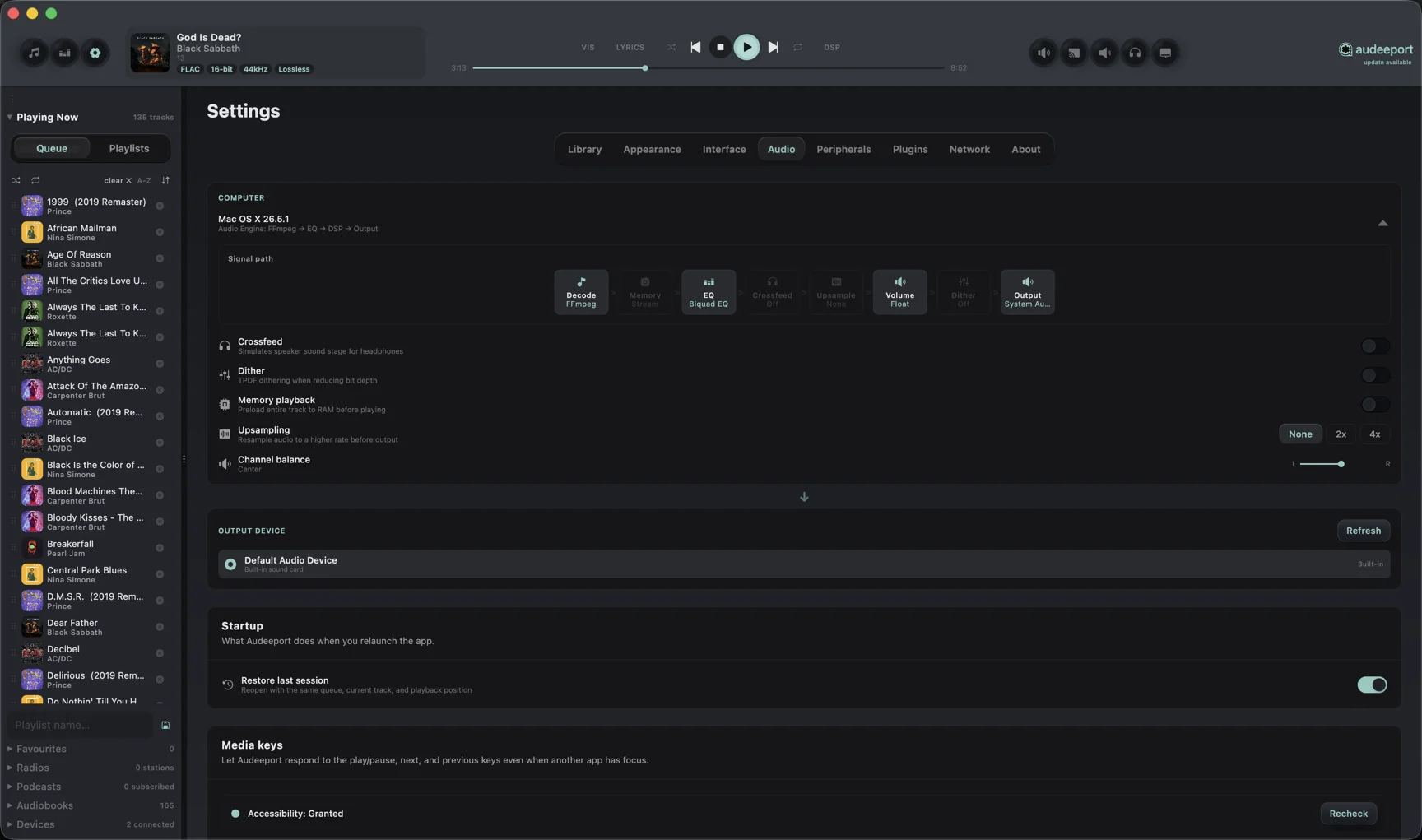
File > Decode > Float32 PCM > EQ > DSP chain > Volume > Dither > OutputEvery block runs in 64-bit float internally. The diagram lists Float32 because that’s what gets handed between blocks. Dither is the last operation before the output stage, applied at the bit depth of your DAC.
The DSP chain is user-configurable in Settings > Plugins. You stack effects in any order: crossfeed, subsonic filter, Haas widener, dither, tube saturation, reverb, FIR EQ, vinyl simulator, and more. The signal-path diagram in Settings is live. It greys out blocks you’ve turned off and highlights the ones doing work.
Supported formats
Lossless
FLAC, ALAC, WAV, AIFF, APE, DSD (DoP), WavPack, TTA, TAK, Shorten.
Lossy
MP3, AAC, OGG Vorbis, Opus, WMA, Musepack, AC3, DTS.
Containers
M4A, M4B, MKA, OGA, WebM, CAF.
Network streams
HTTP / HTTPS Icecast and Shoutcast for radio. RSS-served audio for podcasts.
Plus thirty-plus more codecs decoded via the bundled engine. If a player can play it, Audeeport probably can too. If something specific isn’t working, that’s a bug we want to know about.
Sample-rate switching
At every track start, Audeeport asks the output device for the source rate. If the device supports it, the engine switches. If not, it falls back to the closest supported rate.
On macOS with Exclusive Output enabled, the device sample rate is set per track. Your DAC actually changes its hardware rate to match the file. Expect a brief silent gap (typically ~200 ms) at every track-to-track sample-rate change. This is a hardware constraint, not a bug.
On Windows and Linux today, sample-rate switching happens through the system mixer rather than at the driver level. Bit-perfect, exclusive-mode output for these platforms is on the roadmap.
Hi-res support
The engine supports up to 768 kHz / 32-bit internally. The actual ceiling is whatever your DAC accepts. DSD plays via DoP at the rates your hardware accepts (DSD64, DSD128, DSD256, DSD512).
The output-device negotiation respects your DAC’s capability table. If a file is 384 kHz and your DAC tops out at 192 kHz, the engine downsamples cleanly using a high-quality SRC.
Gapless playback
Five seconds before the current track ends, the engine begins decoding the next one in a separate thread. At the exact sample boundary, the buffers swap. There is no fade, no cross-correlation, no inserted silence. The resulting waveform is bit-identical to a single concatenated file.
This works across format, sample-rate, and bit-depth changes between adjacent tracks. The only audible artifact is the silent moment your DAC needs to switch sample rate, on tracks where the rate actually changes.
macOS exclusive output
When Settings > Audio > Exclusive Output is enabled on macOS:
- Hog mode. Audeeport requests exclusive access to the device. Other apps can’t play through it until you give it back.
- Sample-rate switching. Per track, at the device level.
- Bit-perfect path. No system mixer, no resampling, no volume math beyond what you’ve explicitly asked for.
- Compromise warnings. Any time volume, EQ, or a DSP plugin would alter the signal, the player bar shows a warning pill. Hover for what’s altering the signal and how to disable it. Each plugin reports whether it is actually changing samples, and that flag drives the pill, so a flat EQ or a bypassed effect stays clean while an active one shows up.
- Hot-swap mid-track. You can change exclusive-output devices while playback is running. Audeeport pauses for ~500 ms and resumes on the new device.
Volume on macOS exclusive output is delegated to the DAC’s hardware volume where supported (VirtualMainVolume), with software attenuation as a fallback.
Volume and speed
Software volume runs in 64-bit float through the engine. On macOS, the player can sync to system volume so that your media keys, menu-bar slider, and Audeeport’s slider all stay in lock-step.
Speed control preserves pitch and is available for both audiobooks and podcasts. Audiobooks run from 0.75× to 2× and remember a per-book speed; podcasts have a session speed of 0.8×, 1×, 1.2×, 1.5×, 1.8×, or 2×.
Where to go next
- Equalizer. Bands, profiles, and headphone correction.
- Keyboard shortcuts. For transport.
- Privacy. What the engine never does over the network.